14-day free trialEvery core module, plus your industry add-onsPre-loaded with sample dataNo credit card neededInvoices ready for UAE e-invoicingBring your own data the same dayInstall on iPhone, Android, Mac & Windows14-day free trialEvery core module, plus your industry add-onsPre-loaded with sample dataNo credit card neededInvoices ready for UAE e-invoicingBring your own data the same dayInstall on iPhone, Android, Mac & Windows
14-day free trial: every core module plus your industry add-ons, pre-loaded with sample data, no credit card needed, invoices ready for UAE e-invoicing.Start free trial →
The whole project, stage by stage, in front of the client
Twelve stages from the business case to after-sales and facility management. The project team runs each stage in Mizo; the client logs in to their own portal and sees the same stage, progress, documents, photos and payments, at any hour, without waiting for the monthly report.
app.mizo.co · Client portal
ProjectOffice fit-out, Business BaySample client · sample data
Overall progress48%
Now: Execution and Monitoring and control
Initiate
Design
Buy
Build
Complete
Operate
DoneStage 1 of 12 · Initiate
Set the project up
Business case, scope, objectives, the project team and the client's contacts, with the budget and target dates.
In the client portal
Scope, objectives and target dates
Who is on the project team
Documents
Project charterScope statement
DoneStage 2 of 12 · Initiate
Plan it properly
Work breakdown, the baseline programme and critical path, the baseline budget, the risk register and the reporting calendar.
In the client portal
Baseline programme and key milestones
Baseline budget
Top risks and what is being done about them
Documents
Project planProgrammeRisk register
DoneStage 3 of 12 · Design
Manage the design
Consultant appointments, design stages, drawing registers, RFIs and submittals, kept to the programme.
In the client portal
Design stage and drawings issued
RFIs open and answered
Documents
Drawing registerDesign reports
DoneStage 4 of 12 · Buy
Buy and contract
Tenders, bid comparison, contracts and long-lead items, followed to delivery on site.
In the client portal
Each package and the stage it is at
Contracts awarded, with values
Documents
ContractsPurchase orders
DoneStage 5 of 12 · Build
Get to site
Site set-up, permits to work, insurances, the site team and the health and safety plan.
In the client portal
Mobilisation date and site team
Permits and insurances in place
Documents
HSE planInsurances
In progress · 55%Stage 6 of 12 · Build
Run the site
The daily site diary, manpower and plant, work done, inspections, NCRs, variations and progress payments.
In the client portal
Site photos and the daily diary
Inspections and NCRs
Variations and their cost
Documents
Site diaryNCR logVariation register
In progress · 60%Stage 7 of 12 · Build
Keep it on track
Progress against the baseline, earned value, cash flow, forecast at completion and the monthly report. Runs from the first day to the last.
In the client portal
Percent complete, planned against actual
Forecast cost and finish date
The monthly report
Documents
Monthly reportCash-flow forecast
PlannedStage 8 of 12 · Complete
Prove it works
Tests, system commissioning and the authority inspections before completion.
In the client portal
Tests passed and outstanding
Commissioning of each system
Documents
Test certificatesCommissioning records
PlannedStage 9 of 12 · Complete
Hand it over
Snag lists, the completion certificate, as-built drawings, O&M manuals, warranties and training for the client's team.
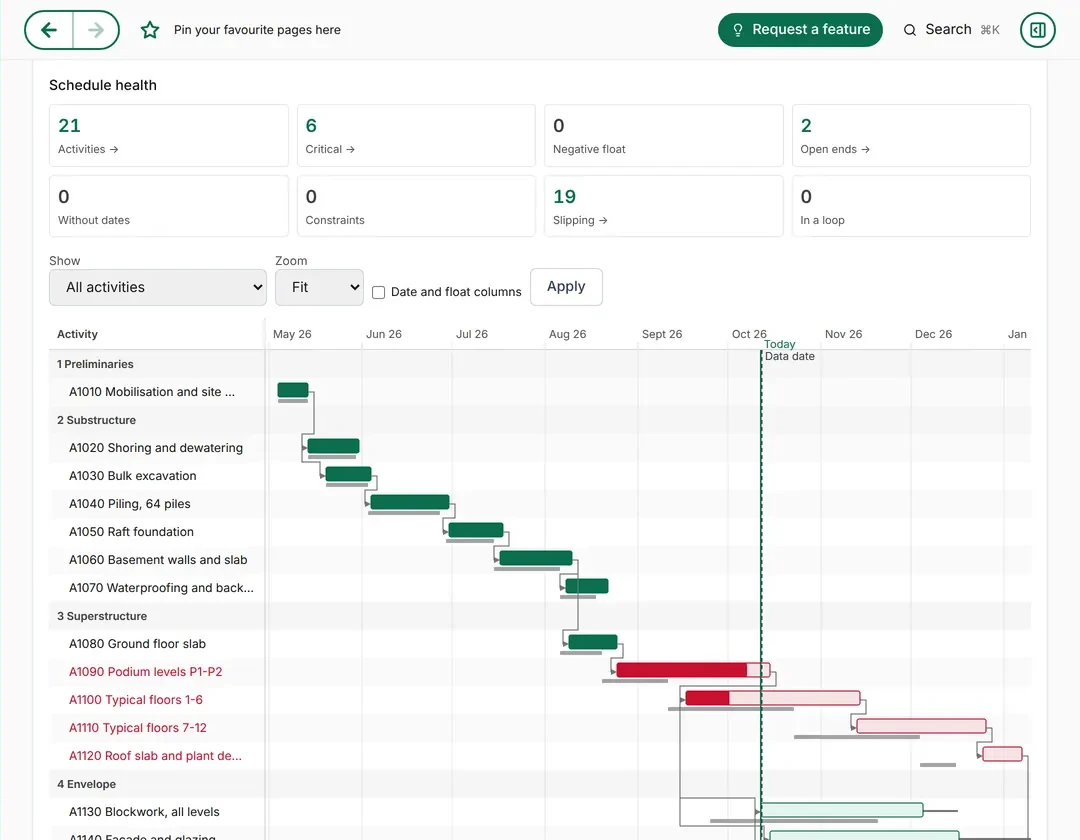
Every activity on a Gantt chart with its links, the critical path and the baseline beside today's progress. Then the view forward: what is due in the next six weeks, and when the project will really finish at the current pace.
Live view
The Gantt chart, as the planner sees it
app.mizo.co
123
1Schedule health first: critical activities, slipping work and open ends, counted.
2The critical path in red, with each bar against its grey baseline.
3The today line splits what is done from what is ahead.
Look-ahead: the next six weeks
From 13 Oct
Blockwork, levels 1–3Envelope · starts
On track
Façade mock-up on siteEnvelope · milestone
On track
Typical floors 1–6, last slabSuperstructure · critical
Screens and charts shown with sample data: an invented building project. Want the full programme as a document? See the sample project programme.
Run it yourself, or with us
Use the platform, or let Mizo Projects run it for you
Your own team can run every stage in Mizo. Or our project management team runs the project for you, and you follow every stage in your portal like any other client.
 123
123