Plan
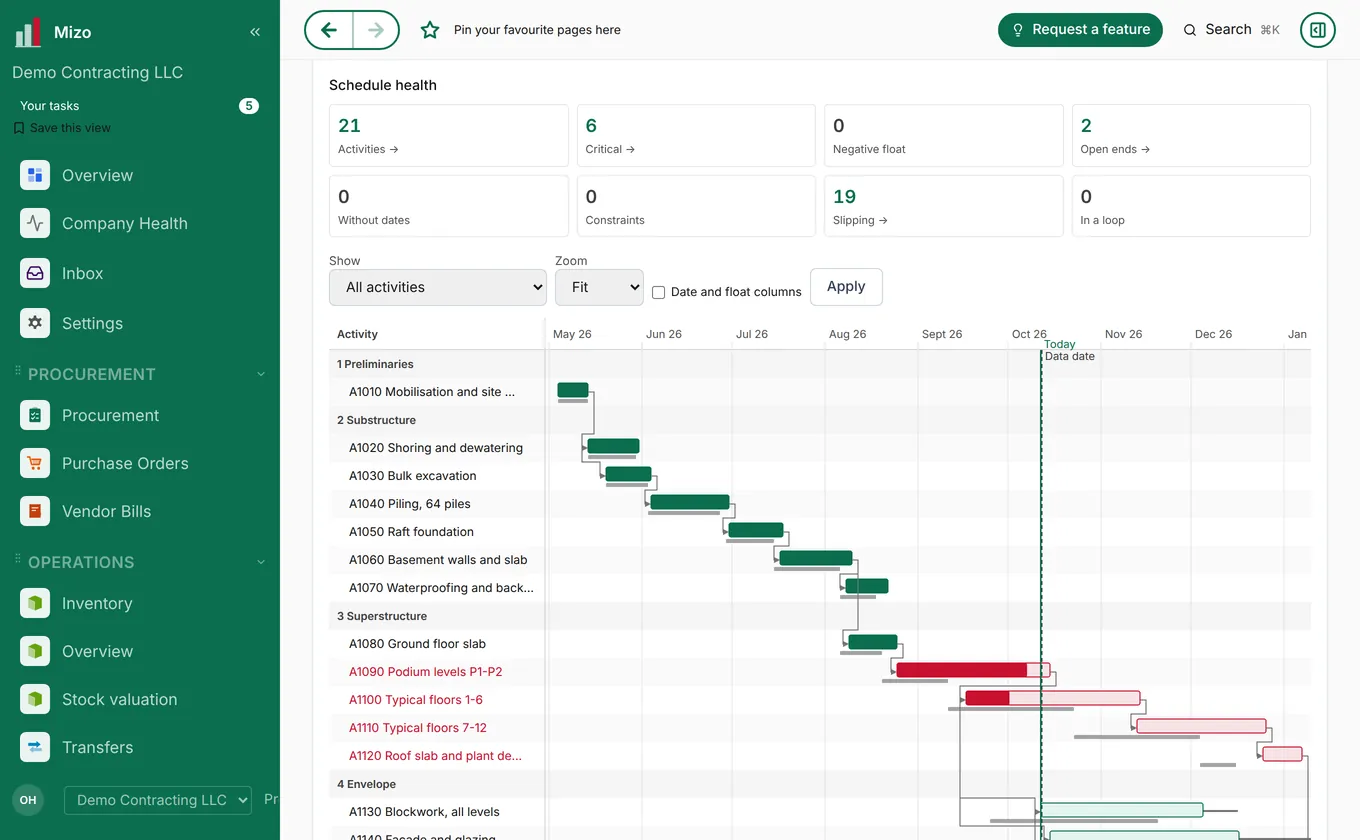
Plan every project
Schedules with the critical path, baselines and look-aheads, budgets and milestones, all in one place.
Mizo OS, the operating system for your company. One platform and one company record that runs planning, procurement, design, projects, property, finance and the day-to-day, with the Mizo Group centres able to deliver the work too. Secure by default, ready for UAE e-invoicing.
14 days, full access, pre-loaded with sample data so you can explore right away.
Patent pending
A real screen from Mizo, shown with a demo company and sample data.
A schedule in one file, quotes in e-mail, site updates on WhatsApp, invoices in another system and customer requests lost in an inbox — with someone re-typing the same number three times a week.
Plans, purchases, site progress, stock and accounts live in separate places, so nobody sees the whole job until it is too late to act, and every month-end starts with matching numbers by hand.
VAT, GST, or sales tax handled by hand means a rounding mistake surfaces at filing time — not before it matters.
Getting a live P&L means pulling data into Excel and trusting the formulas still work.
It's the opposite when it's built right: on-prem systems depend on whoever's watching the server that day. Mizo requires multi-factor authentication, enforces 98 granular permissions per user, and logs every change — controls most on-prem installs never get around to configuring.
Mizo is where a business plans the work, sources it, designs and builds it, delivers and bills it, looks after its customers and runs the day-to-day. And when you would rather have the work done for you, a Mizo team can do it with you.
Schedules with the critical path, baselines and look-aheads, budgets and milestones, all in one place.
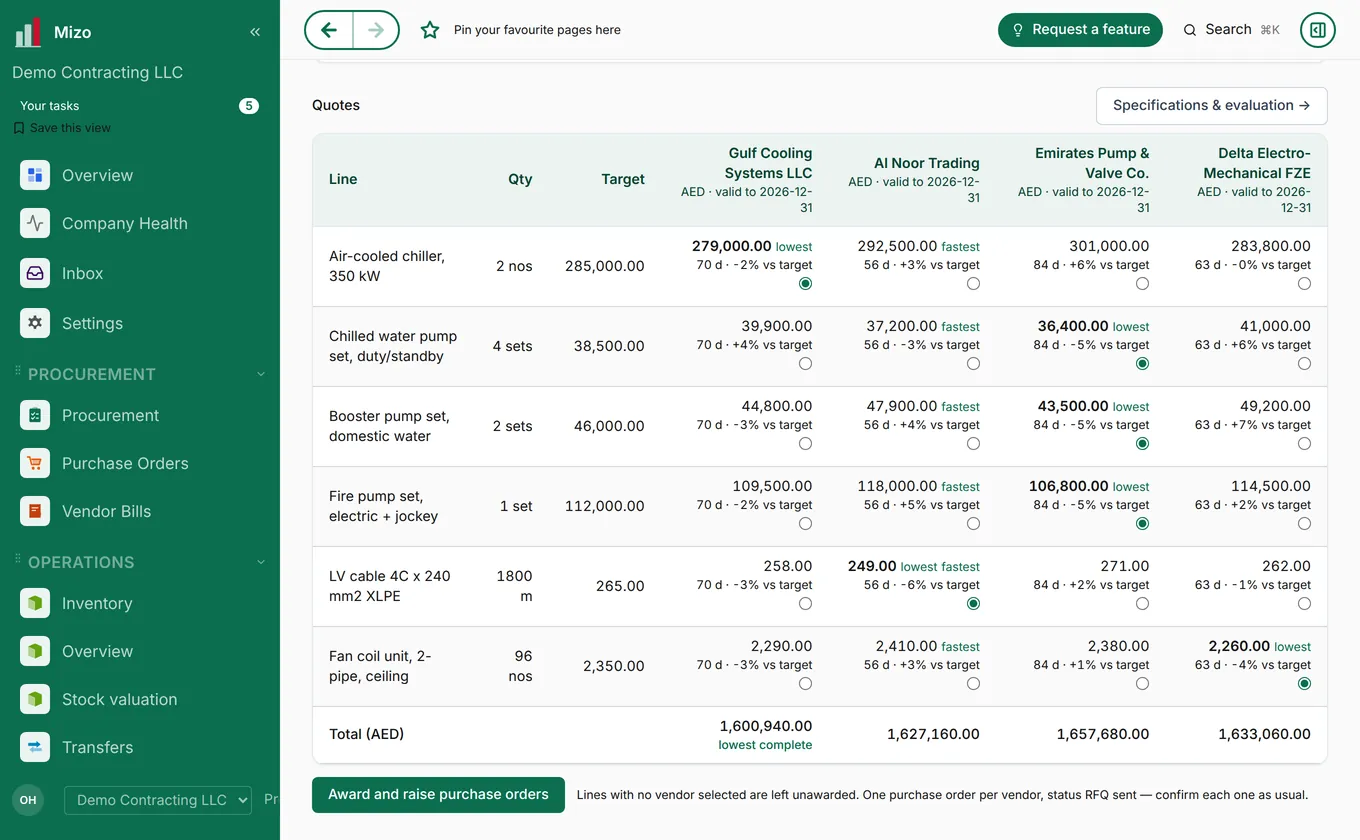
Requests for quotation to many suppliers, quotes compared line by line on price and lead time, awarded straight into purchase orders.
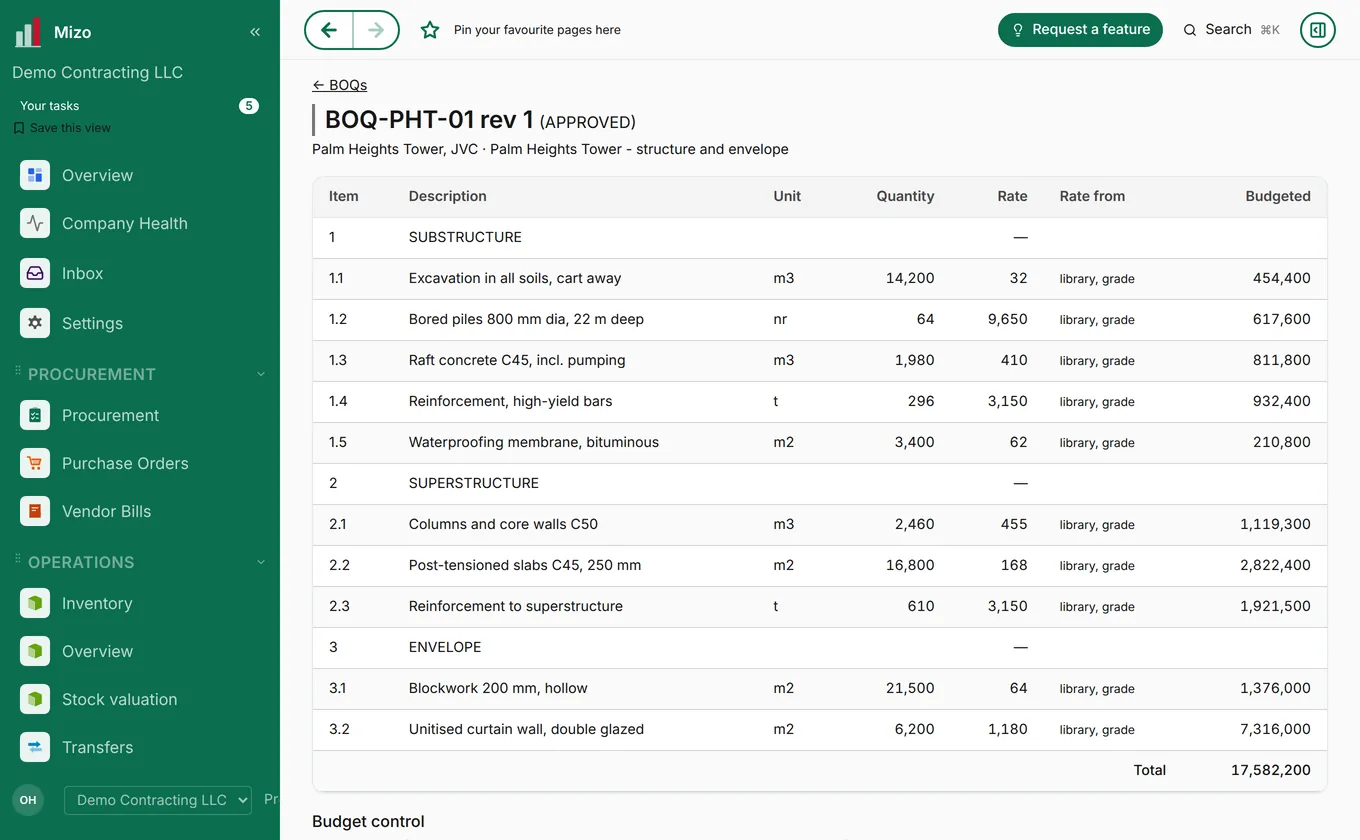
Design options with bills of quantities and cost estimates, so decisions are made on numbers, not guesses.
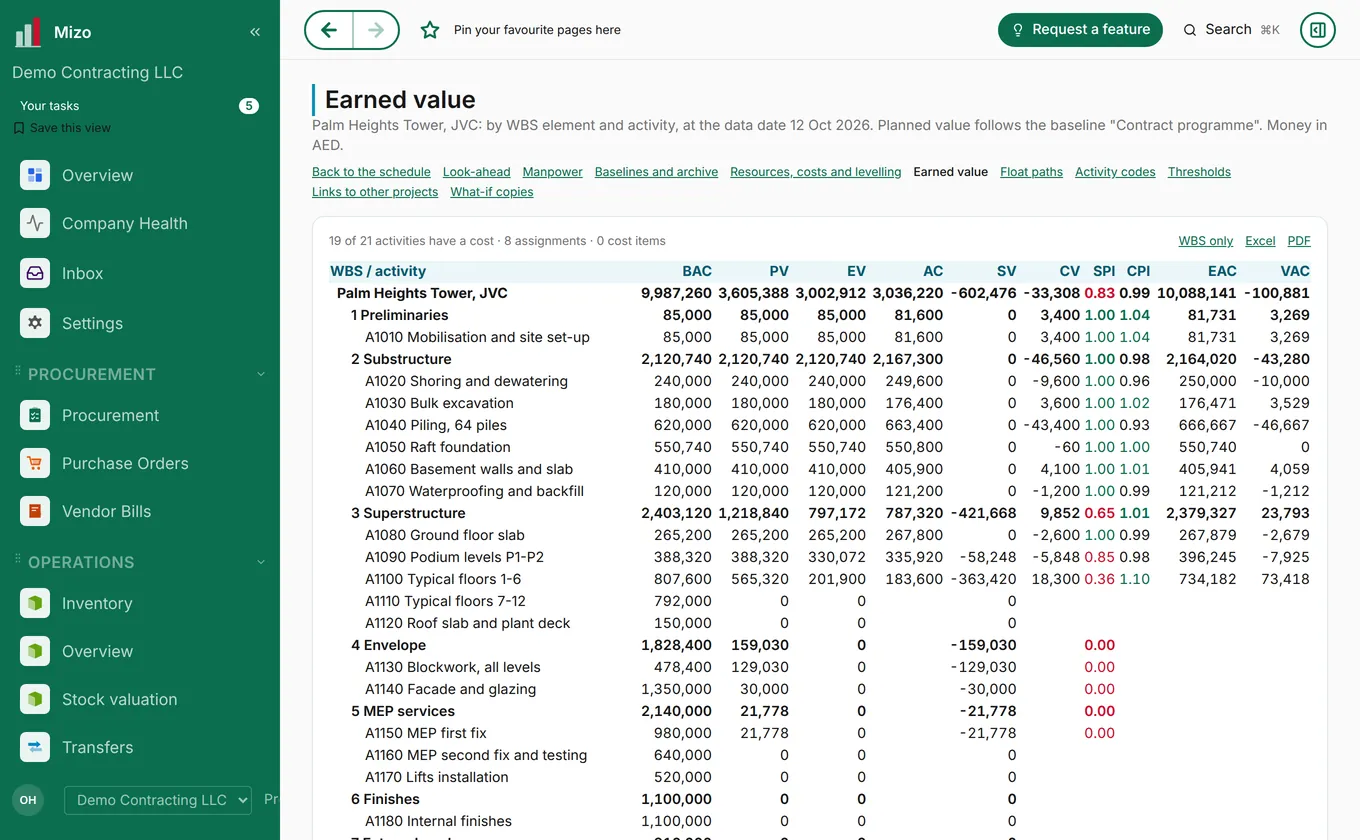
Progress, earned value and cost against budget, so slippage shows up before it costs money.
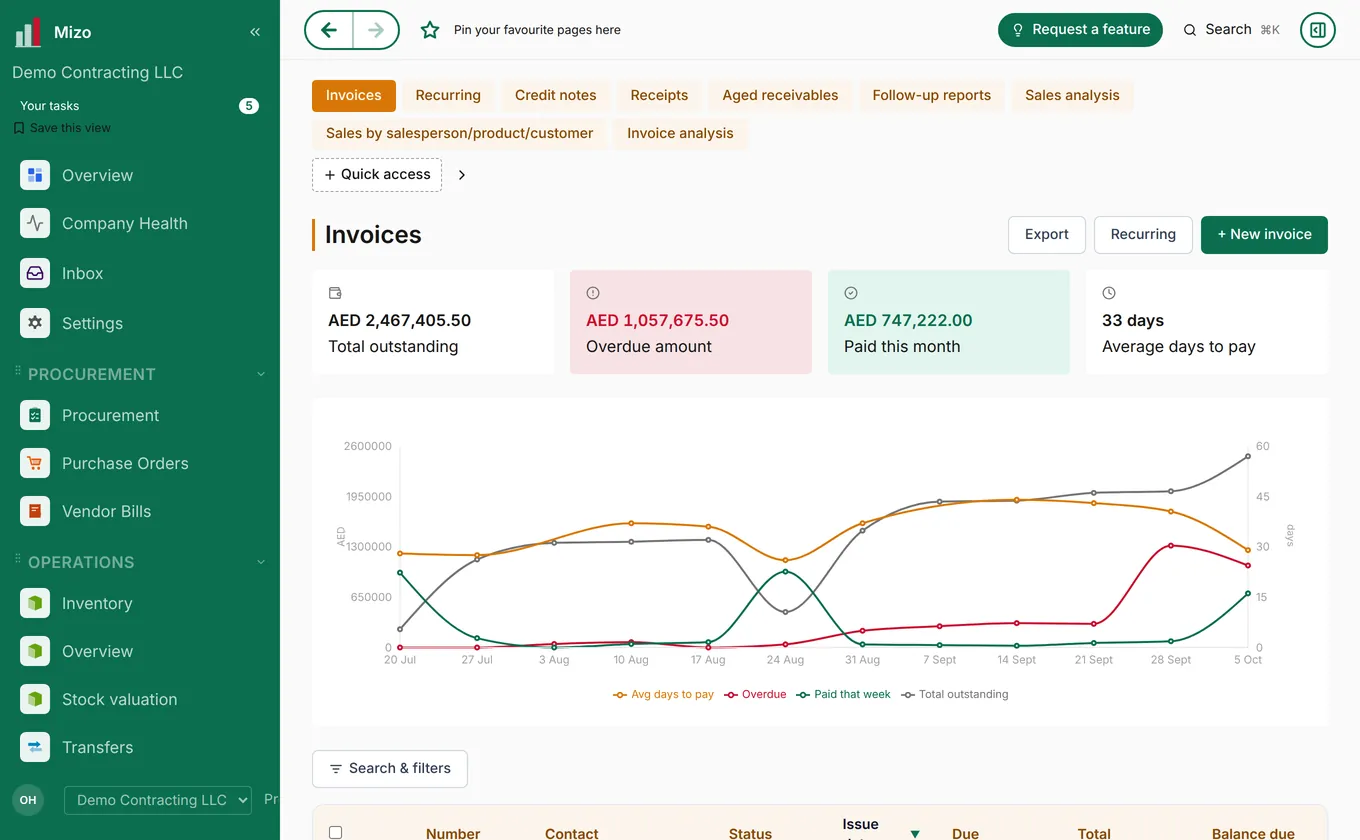
Invoices ready for UAE e-invoicing, overdue amounts that surface themselves, and a live view of cash coming in.
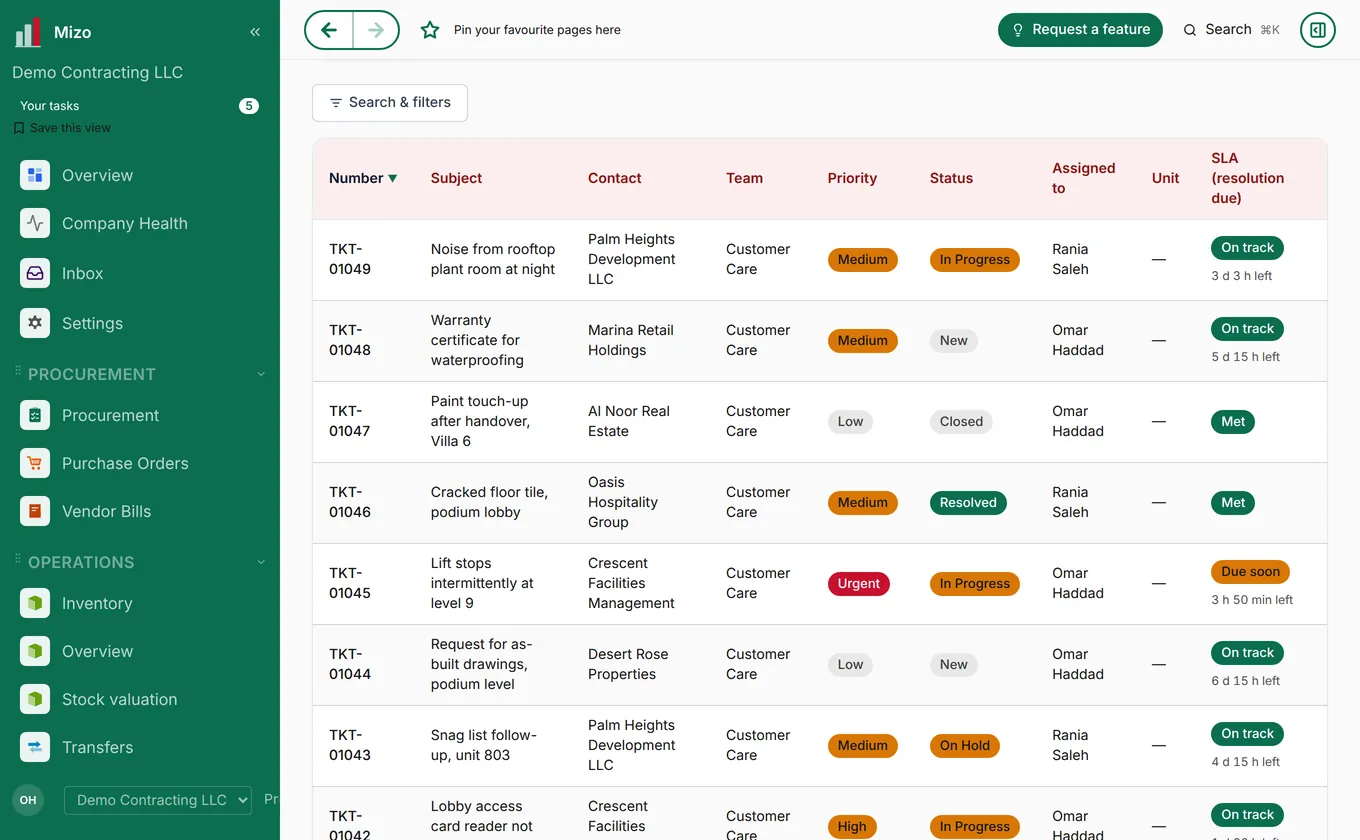
Helpdesk tickets with teams, priorities and service targets, so every customer request is answered on time.
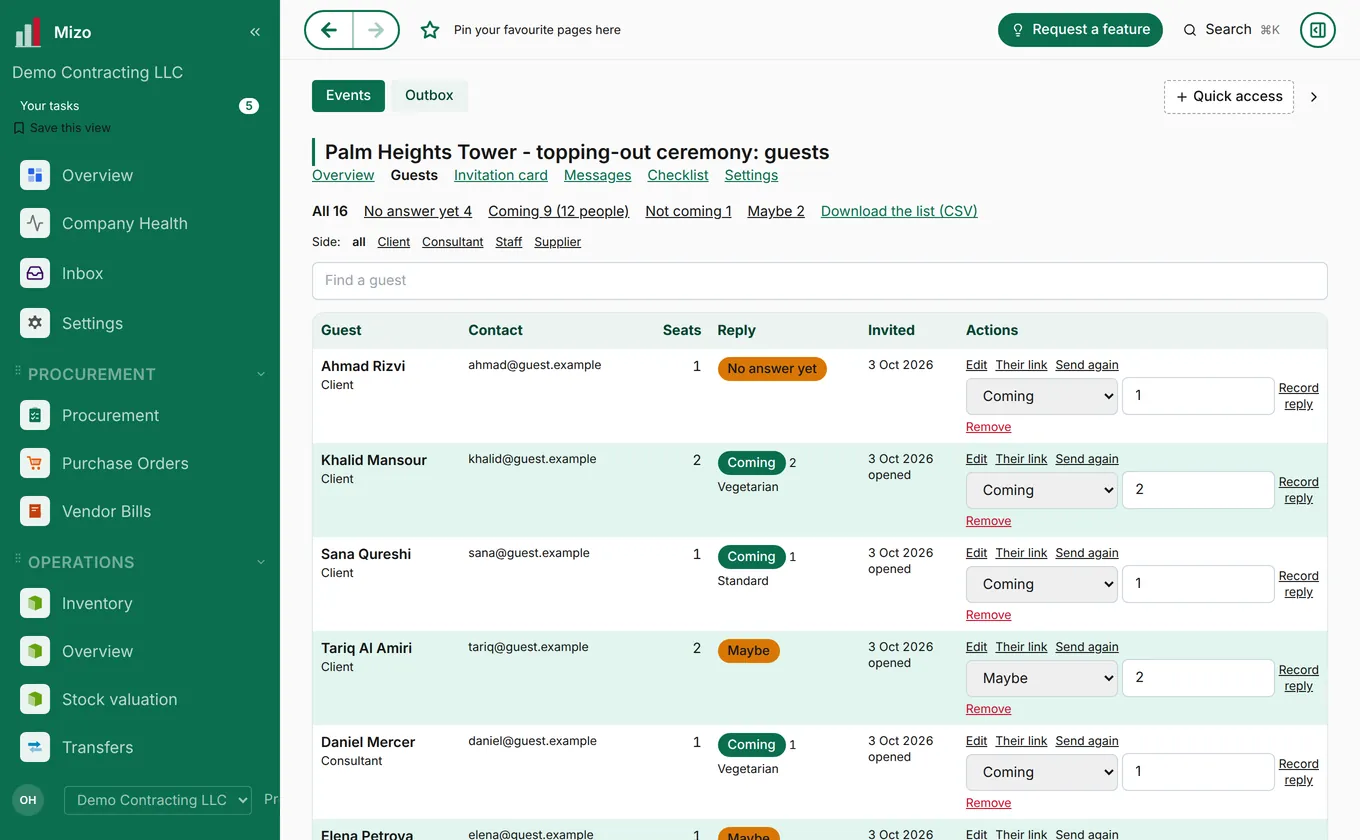
Guest lists, invitations, replies, seats and meals for launches, ceremonies and company events.
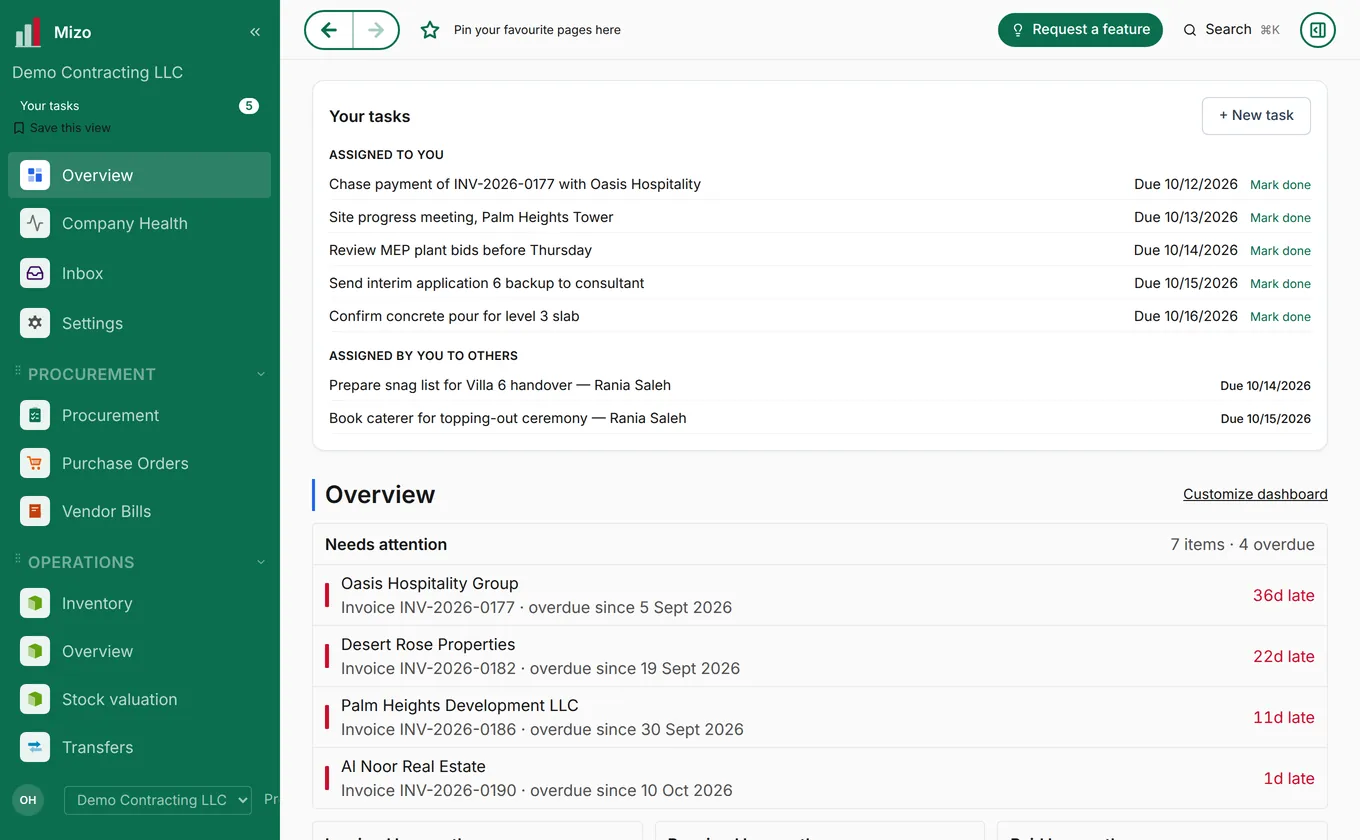
Tasks for you and your team, and what needs attention today, the moment you sign in.
Real screens from Mizo, shown with a demo company and sample data.
Pick a job and follow it from the first step to the last. Every stage runs in Mizo OS, on the same record, and each one opens up on its own page.
Due diligence, the sale agreement, land instalments and the registered transfer.
Unit mix, cost, sales value, margin and funding, in versions you can compare.
Planning permission, building permit and every NOC, with reference, fee and dates.
Options with renders and plans, from concept to construction drawings.
The design priced as a bill of quantities: the budget every package is bought against.
Tenders, bid comparison, award, bonds and retention.
Long-lead items followed from request for quotation through shipping to site.
Programme, site diary, manpower, progress, variations and progress payments.
Inspections, material tests and commissioning, then the completion certificate.
Units, bookings, sale agreements and instalments called as each milestone is reached.
Snag lists, handover to each buyer, title deeds and the maintenance manuals.
Defects liability: buyer requests and defects, each fixed and recorded.
Owners association, service charges and the facility management contract.
Scope, objectives, the team on both sides, budget and target dates.
Work breakdown, baseline programme and critical path, budget and risk register.
Consultants, drawing registers, RFIs and submittals, kept to the programme.
Tenders, bid comparison, contracts and long-lead items.
Site set-up, permits to work, insurances and the safety plan.
Daily site diary, manpower and plant, inspections, NCRs and variations.
Progress against the baseline, earned value, cash flow and the monthly report.
Tests, system commissioning and the authority inspections.
Snag lists, completion certificate, as-built drawings, manuals and warranties.
Final account, retention, release of bonds and the archive.
Defects liability: requests and defects logged, fixed and recorded.
Planned and reactive maintenance, assets and service contracts.
Quantities, specifications and drawings in one request, checked against design and budget.
Manufacturers shortlisted and invited; technical questions answered once, for every bidder.
Quotes normalised for scope, freight, duties and terms, then compared line by line.
Purchase order or letter of award, with advance and performance guarantees.
Manufacturing chased before it slips; factory tests and pre-shipment inspection.
Booking, bill of lading, customs clearance and the expected arrival.
Lines that will miss their needed-by date are flagged before the site is kept waiting.
Counted and checked on arrival, damage and shortages recorded, released to the right area.
The supplier invoice matched to the order and what was received, then paid.
Each journey is the short version. The full pages show every stage with sample projects and what the client sees.
New features, modules and projects, as they go live.
Our procurement team sources windows, doors, tiles, facade, sanitary ware, lighting and MEP materials from manufacturers in China and worldwide, for developers and contractors in the UAE, Pakistan and the Gulf. Manufacturers can join as suppliers in English or Chinese, with a step-by-step supplier guide.
Two new centres. Healthcare: patients, doctors' time, beds, theatres, pharmacy and billing on one record. Education: admissions, fees, timetables, exams and parents, for one school or a group of campuses.
A 4:40 video, with English voice-over and subtitles, walking through how a project runs in Mizo from the plan to the handover.
Built to the Ministry of Finance's mandatory field specification, so it's ready before the deadline arrives rather than after.
Appoint an accredited service provider by 30 October 2026. Go live by 1 January 2027.
Appoint an accredited service provider by 31 March 2027. Go live by 1 July 2027.
Missing a deadline costs AED 5,000 a month, plus AED 100 per invoice not sent on time. Mizo prepares every invoice in the UAE format (PINT AE) against the Ministry's mandatory field list, and sending through our accredited partner is included in every paid plan from January 2027. Already appointed a provider? Connect that one instead.
Container shipments, landed cost, and multi-currency invoicing in one connected system.
Real hybrid-power dispatch design for sites running on grid, solar, battery, and generator.
POS that posts to the ledger instantly, with time-bounded pricing across dine-in, takeaway, and delivery.
From plot and feasibility to design, procurement, site control, sales and handover, in one place.
Guest lists, invitations and replies, plus the helpdesk and maintenance behind every venue.
Project-based costing with technical and commercial bids kept structurally separate.
Each part of Mizo has its own page.
Start a free 14-day trial, pre-loaded with sample data — or bring your own from day one.
Start free trial